OCR 오픈소스 tesseract(Docker)를 이용한 데모 페이지 개발
(이 포스팅은 https://jukyellow.github.io/2021/02/20/OCR-Tesseract-Demo/ 에서 이전한 글입니다)
- 현재 인터넷에 공개되 있는 ‘Tesseract 데모 페이지 구현 블로그’는 구 레파지토리(google) 버전이라 실행이 불가능하다. 하여 최신 레파지토리(github) 기준으로 동작가능한 데모 페이지로 오류를 수정하여 내용을 공개한다.
- 또한, 기존 블로그는 모바일 환경을 지원하지 않지만, 모바일에서 카메라 캡처->Text추출 가능한 소스로 업데이트 예정이다.
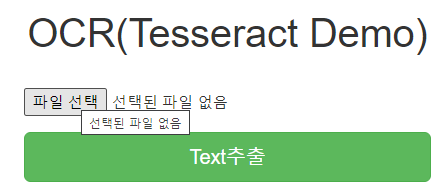
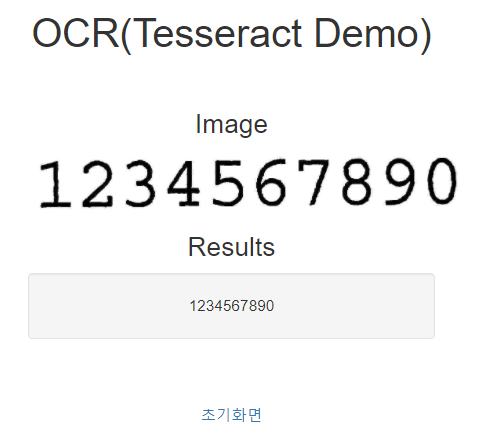
실행화면
- 초기화면
- Text 추출 결과
tesseract 다운로드
도커 이미지 다운로드
- https://tesseract-ocr.github.io/
- https://tesseract-ocr.github.io/tessdoc/
- https://tesseract-ocr.github.io/tessdoc/4.0-Docker-Containers.htmlTesseract 4 OCR Runtime Environment - Docker Container
(레파지토리) https://github.com/tesseract-shadow/tesseract-ocr-re
image 다운로드
docker pull tesseractshadow/tesseract4re .샘플 테스트 (복사 & 실행)
- test.sh
docker cp ./ocr-files/phototest.tif t4re:/home/work/$TASK_TMP_DIR/
docker exec -it t4re /bin/bash -c "mkdir -p ./$TASK_TMP_DIR/out/; cd ./$TASK_TMP_DIR/out/; tesseract ../phototest.tif phototest -l eng --psm 1 --oem 3 txt pdf hocr"
데모 페이지
pytesseract 설치 및 Flask 웹서버 연동
- 출처: https://realpython.com/setting-up-a-simple-ocr-server/#web-server-time
- (source) https://github.com/ybur-yug/python_ocr_tutorial(tesseract 설치/구동까지는 1번참고, 해당 자료는 tesseract 구레파지토리를 사용하는 옛날버전인듯)
pytesseract를 설치하는 부분은 1)번 + 별도 dockerfile로 구성
도커실행
- 5000: ocr tesseract flask port
docker build -t ocr_tesseract_web .
docker run --name ocr_tesseract_web --publish 5000:5000 -it ocr_tesseract_web
dockerfile
- tesseractshadow/tesseract4re + Flask 웹서버 구동을 위해서 일부 오류수정 추가
# start with a base image
# FROM ubuntu:14.04
FROM tesseractshadow/tesseract4re

## install dependencies
RUN apt-get update
RUN apt-get install -y liblog4cplus-dev
RUN apt-get install -y python python-pip

RUN ls
WORKDIR /
RUN ls
ADD requirements.txt /
RUN pip install -r requirements.txt

# pil error : decoder jpeg not available
RUN pip uninstall Pillow -y
RUN apt-get install -y libjpeg-dev
RUN pip install Pillow

# update working directories
ADD ./flask_server /flask_server
WORKDIR /flask_server

#EXPOSE 5000
CMD ["python", "app.py"]
Flask app
- app.py
@app.route('/') def main(): return render_template('index.html') @app.route('/v{}/ocr'.format(_VERSION), methods=["POST"]) def ocr(): print('--call ocr processing --') try: if request.files.get("image"): print('--read image --') # read the image in PIL format image = request.files["image"].read() image = Image.open(io.BytesIO(image)) print('RECV:', image.format, image.size, image.mode) output = process_image2(image) print('output:', output) return jsonify({"output": output}) else: return jsonify({"error": "only .jpg files, please"}) except Exception as e: print('ocr processing exception:' , e) print(traceback.format_exc()) return jsonify( {"error": str(e)} ) - javascript
$('#submit').on('click', function(event){
	$("#results").hide()
	var data = new FormData();

	if(is_mobile){
		var cFile = getCaptureImg();
		data.append("image", cFile);
	}else{
		var file = $('#file')[0].files[0];
		data.append("image", file);
	}

	$.ajax({
	  type: "POST",
	  url: "/v1/ocr",
	  enctype: 'multipart/form-data',
	  data : data,
	  processData: false,
	  contentType: false,
	  cache: false,
	  timeout: 600000,
	  success: function(result) {
		console.log(result);
		$("#post-form").hide()
		$("#retry").show()
		$("#results").show()
		$("#results-data").html("<div class='well'>"+result["output"]+"</div>");
	  },
	  error: function(error) {
		console.log(error);
	  }
	});
});
Source
- 전체 source: https://github.com/jukyellow/artificial-intelligence-study/tree/master/13_ImageProcessing/OCR(Tesseract)/pytessract_dockerfike
- 참고: PC 크롬환경에서 테스트완료, 모바일 환경은 테스트 못함(소스는 모바일(아이폰) 환경도 가능한 모듈로 구성)
'AI > Vision' 카테고리의 다른 글
| Face Check in 구현 (2) | 2025.08.22 |
|---|